
PrettyUp - Video Body Editor
accordionPhotography
4.41.12K Reviews
- Version
- 7.7.1.1
- Installs
- 10.00M
- Age Rating
- Teen
Screenshots
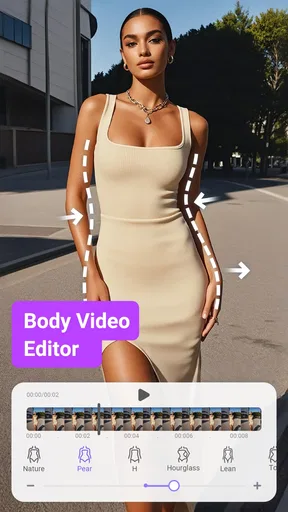
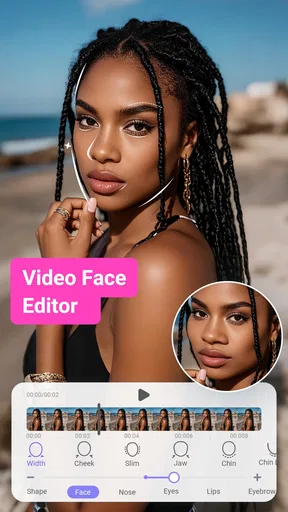
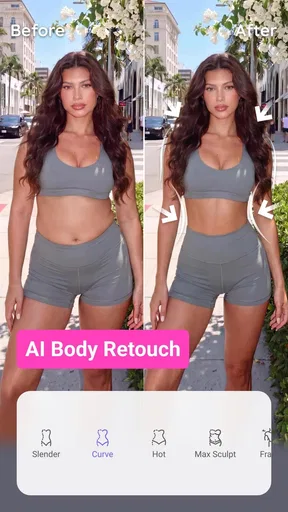
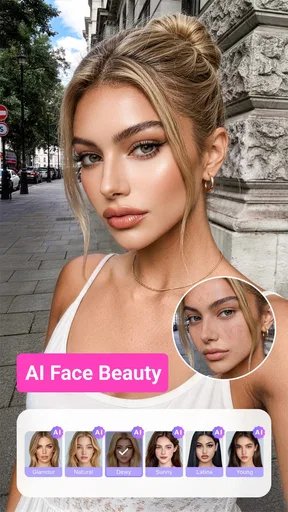
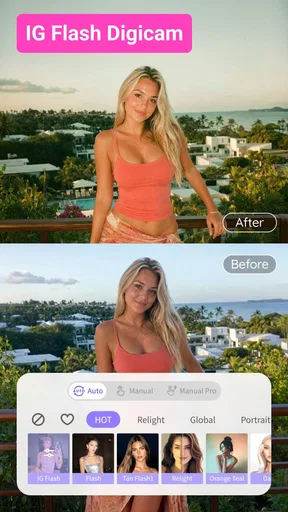
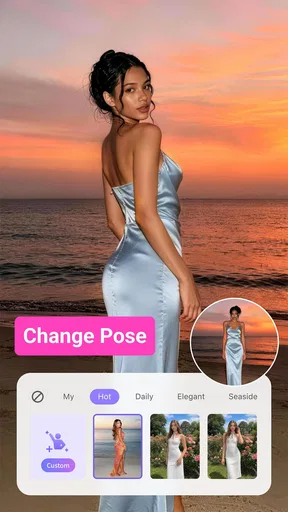
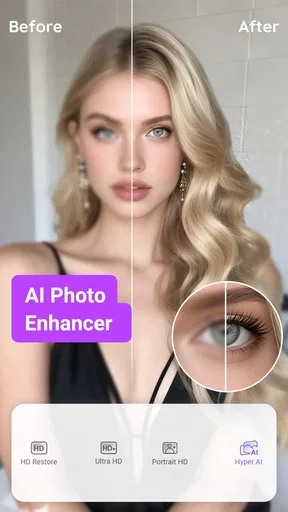
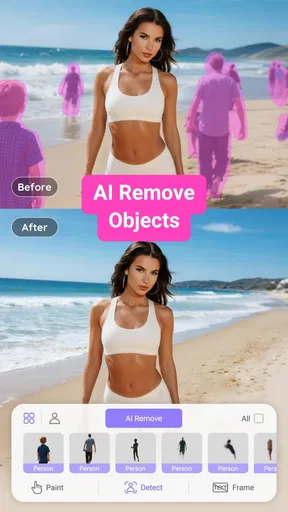
Our Review of PrettyUp - Video Body Editor
 Analysis by Appyee
The first few sessions with a video retouching app can feel like discovering a whole new way to use the clips already sitting on your phone. You start with a short recording, try a small adjustment, and suddenly a video that felt unfinished seems ready to share. That quick payoff is the most appealing part of PrettyUp - Video Body Editor. I’d treat it as a focused tool for polishing selected footage, though, rather than a replacement for every kind of video editor.
Why the first week feels rewarding
PrettyUp is a photography app from accordion, built around changing how faces and bodies look in video. Its appeal is easy to understand: the adjustments are aimed at the subject, not at arranging a complicated timeline or building a full production. If you want to make a selfie clip feel a little more finished, that narrow focus can be much less intimidating than learning desktop editing software.
The app’s first-week novelty comes from seeing how a subtle change affects moving footage. A still photo lets you inspect one frame; a video asks whether an adjustment stays convincing as you turn, walk, or gesture. I recommend starting with a very light touch and watching the whole clip before saving. What looks fine in one paused moment can feel distracting once the subject moves.
That makes it useful for a quick social post, a casual video message, or a short clip you want to share with friends without turning the task into a project. It is less suited to someone who mainly wants to assemble several scenes, tell a story with precise cuts, or build a detailed soundtrack. For those jobs, a conventional video editor is the better starting point.
A practical routine for everyday clips
Picture taking a short outfit video before meeting friends. The lighting is decent, the framing is usable, but you notice a small detail you would like to soften before posting. With PrettyUp, you can open the clip, make a restrained face or body adjustment, review the movement, and decide whether the result still looks like you. That last check matters more than chasing a dramatic before-and-after effect.
A useful habit is to keep an untouched copy of the original clip and compare it with the edited version before sharing. This gives you an easy way to judge whether the change improves the video or merely makes it different. It also helps if you later want to try a lighter edit instead of having to recreate the original look from memory.
For clips with several people, busy backgrounds, or lots of movement, take extra time to inspect edges and transitions throughout the footage. Retouching that seems seamless against a plain wall may be more noticeable when a person passes close to the subject. This is not a reason to avoid the app; it is a reason to choose the right clip and keep expectations realistic.
Feature-Packed Editing Power
So, what's the deal with PrettyUp? First off, it’s not just about filters and overlays—this app goes deeper, allowing you to tweak body shapes in videos. Imagine being able to adjust your waistline or enhance your curves without the need for complex editing software. It’s like the Photoshop of video editing, minus the learning curve.
The app provides a range of tools to adjust your body and face. From smoothing skin to reshaping body parts, it's all about giving you control over how you present yourself on video. If you're feeling a bit adventurous, you can even play around with the face editor to refine your jawline or brighten your eyes. It’s surprisingly intuitive, and the results are pretty natural-looking.
User-Friendly Interface
One of the first things I noticed is how user-friendly the interface is. You don’t need to be a tech whiz to navigate through the app. The layout is clean, and the tools are clearly labeled, making it easy to find exactly what you need without getting lost in a sea of options.
The editing process is straightforward: you select the video, choose the feature you want to adjust, and use sliders to make your changes. It’s like a digital makeover that’s as easy as pie. And if you’re worried about making a mistake, don’t be! There’s always an undo button to save the day.
Customizable Filters and Effects
Beyond body and face editing, PrettyUp offers a variety of filters and effects to give your videos a professional touch. Whether you're going for a vintage vibe or a fresh modern look, there’s something for everyone. And let’s not forget about the music options. You can add tunes to your videos directly from the app, setting the perfect mood for your masterpiece.
These features are perfect for anyone looking to amp up their social media game. With a few taps, you can transform ordinary clips into eye-catching content that’s sure to grab attention.
Knowing when another editor is a better fit
PrettyUp’s strength is its emphasis on portrait retouching. A general-purpose editor is usually more practical when the main job is trimming scenes, organizing several clips, balancing a sequence, or controlling the pace of a longer video. A photo editor is a more natural choice when you only need to refine a single still image. PrettyUp makes the most sense when the footage itself is the thing you want to adjust.
That distinction can save time. If you have one short selfie clip, a specialized retouching workflow is likely more direct than building a project in a broad editing app. If you have a family video with different shots and people, using a normal editor for the assembly and leaving retouching out may produce a more consistent result with less fuss.
I’d also think about the audience before editing. A gentle touch may help a clip match the look you want, while obvious reshaping can pull attention away from the moment and make movement seem unnatural. The app gives you room to experiment, but the most useful result is often the one that does not announce itself.
Performance and Compatibility
Now, you might be wondering about performance. I tested the app on both Android and iOS, and it runs pretty smoothly on both platforms. Video rendering doesn’t take forever, which is a huge plus when you’re eager to share your edits. It’s important to note that the app does best with recent devices, so if you’re rocking an older phone, you might encounter some lag.
As for compatibility, PrettyUp supports a wide range of video formats, making it versatile enough for most users. This is particularly handy if you’re someone who works with different types of footage.
Month-to-month value, not just the first result
PrettyUp is free to download, has a Teen age rating, and offers in-app purchases priced from $0.99 to $34.99 per item. It has a 4.5 average from around 70,000 ratings and over 10 million installs. Those figures suggest that many people have tried it, but they do not answer the personal question that matters more: will you reach for it after the initial experiments?
For someone who regularly records short portrait videos, a dedicated face-and-body editor can earn a place in a weekly routine. For someone who posts video only occasionally, the app may be useful in bursts and then sit unused between them. I would judge its lasting value by how often I actually have a clip that benefits from these specific adjustments, not by how many options I can try in one sitting.
The app’s current version is 7.0.0, and it was released on September 18, 2020. I would not treat version information as a reason on its own to install or avoid it; what matters in practice is whether the editing flow suits your device and the footage you make. The developer, accordion, has positioned it as a tool for portrait-focused retouching rather than an all-purpose production suite.
Maintenance, storage, and editing habits
The recurring effort is less about mastering a complicated interface and more about staying selective. Every extra pass creates another chance to overwork a clip, so I would settle on a simple personal rule: make the change you wanted, replay the footage from beginning to end, and stop if the edit already feels natural. That keeps a quick enhancement from turning into a long series of tiny corrections.
It is also sensible to keep track of which version you intend to share. If you export multiple attempts, use a clear naming habit or review them side by side before posting. That small bit of organization is especially helpful when you are making variations for different audiences or changing a clip’s overall look with filters and music.
Because video editing can involve repeated previews and saved copies, avoid keeping every draft indefinitely if your phone is already crowded. Decide which version is worth keeping and remove the experiments you no longer need. This is ordinary media housekeeping rather than a special requirement of PrettyUp, but it makes a lightweight editing habit easier to maintain.
Privacy and personal comfort
I know what you’re thinking—what about privacy? The app states that all edits are done locally on your device, meaning your data stays with you. It’s a reassuring feature, especially in an age where data privacy is a hot topic.
However, as with any app, it’s always a good idea to check the permissions and understand what data might be accessed. Better safe than sorry, right?
There is also a personal side to using face and body adjustments. I would use these tools to shape a particular presentation, not as a measure of how I should look in everyday life. If editing starts making ordinary, unedited clips feel unacceptable, taking a break is a better choice than searching for a stronger correction.
Where editing fatigue can set in
The same controls that make experimentation inviting can also make it easy to lose time comparing nearly identical versions. This is where the app’s narrow purpose becomes a trade-off: it is convenient for fine-tuning appearance, but it cannot decide whether a clip needs editing in the first place. Sometimes the original recording, with its natural movement and expression, is the more appealing choice.
Another source of frustration is footage that is poorly suited to retouching. A shaky camera, dim surroundings, a crowded frame, or rapid movement can make a subtle adjustment harder to judge. Rather than trying to repair everything after filming, I would improve the framing and lighting when possible, then use PrettyUp for a small finishing pass.
It may not be the right choice if you want a fully featured editor for long projects, if you dislike appearance-focused tools, or if your phone struggles with video work. In those cases, a standard editor—or simply sharing the original—can be a better use of your time. The best workflow is not the one with the most alterations; it is the one that leaves you happy with the clip.
Conclusion
All in all, PrettyUp - Video Body Editor is a fantastic tool for anyone looking to enhance their videos without diving into complicated software. It’s user-friendly, offers a wide array of features, and the results are genuinely impressive. Whether you’re a social media influencer or just someone who loves sharing videos with friends, this app is definitely worth checking out.
Ready to give your videos that extra sparkle? You can download PrettyUp from the App Store or Google Play and start transforming your footage today!
My long-term verdict
After the novelty fades, I see PrettyUp as a useful specialist rather than an app everyone needs to keep opening. Its strongest case is a person who often makes short, face-forward clips and wants simple, direct control over how those clips present them. The first use is appealing because the effect is immediate; the lasting value comes from having a clear reason to return, not from applying a new treatment to every recording.
If you are deciding whether it belongs on your phone, start with one clip you genuinely want to improve and make only the changes you can explain to yourself. Watch it in motion, compare it with the original, and ask whether you would still share it if nobody noticed the editing. If the answer is yes, the app has done its job. If you mainly want cuts, pacing, or a polished multi-scene video, choose a general editor instead. That is the distinction that makes PrettyUp worth trying without making it a permanent habit by default.
Verdict
Strengths of PrettyUp - Video Body Editor
- User-friendly interface and easy navigation.
- Wide range of editing tools and filters.
- High-quality exports without watermarks.
- Real-time preview of edits before saving.
- Supports various video formats for flexibility.
Limitations of PrettyUp - Video Body Editor
- Limited free features, many require purchase.
- Can be resource-intensive on older devices.
- Occasional ads may interrupt editing flow.
- Some edits may reduce video resolution.
- Requires internet for certain features.
Similar Picks in This Category
View All
Google Photos
Google LLC4.4

Gallery
Google LLC4.2

Picsart AI Photo Editor, Video
PicsArt, Inc.3.9

B612 AI Photo&Video Editor
SNOW Corporation4.1

BeautyPlus-Selfie Photo Editor
PIXOCIAL TECHNOLOGY (SINGAPORE) PTE. LTD.4.5

Remini - AI Photo Enhancer
Bending Spoons4.1
Frequently Asked Questions
What is PrettyUp - Video Body Editor?
PrettyUp - Video Body Editor is a mobile application designed to enhance videos and photos by allowing users to edit their body shape and appearance. It offers features such as slimming, reshaping, and smoothing tools, making it a popular choice for those looking to perfect their social media content.
Is PrettyUp - Video Body Editor free to use?
PrettyUp offers a free version with basic editing features. However, to access advanced tools and remove watermarks, users may need to purchase a subscription. The app provides in-app purchases for premium features, so users should review their options before downloading.
What devices are compatible with PrettyUp - Video Body Editor?
PrettyUp is available for both Android and iOS devices. It supports a wide range of smartphones and tablets, but for the best experience, it's recommended to use a device with a modern operating system and sufficient processing power to handle video editing tasks smoothly.
How user-friendly is PrettyUp - Video Body Editor?
PrettyUp is designed with user-friendliness in mind, featuring an intuitive interface that guides users through the editing process. Even those with minimal editing experience can navigate its tools easily. The app includes tutorials and tips to help users maximize its features effectively.
Does PrettyUp - Video Body Editor compromise photo and video quality?
PrettyUp strives to maintain high-quality outputs. The app uses advanced editing algorithms to ensure that changes to body shape and appearance do not degrade the original quality of the media. However, as with any editing app, users should save a backup of original files before making extensive edits.
